


Guess it! Zoom Pic Trivia Game
4.7142.00 Reviews
App Specs
- Version
- 2.0.3
- Updated On
- License
- Free
- Downloads
- 1,000,000+
- Developer
- PrizePool Studios
- Categories
- Trivia
- Platform
- Android, iOS
Screenshots

 Analysis by AppCompare
I like picture trivia best when it turns something familiar into a small mystery, and that is the appeal of Guess it! Zoom Pic Trivia Game. Instead of asking me to recall dates or facts, it asks me to make sense of a close-up image: a shape, texture, or fragment that may look completely different once I identify it. That makes each round approachable, even if some answers take a few tries.
This is a free trivia game from PrizePool Studios, with a 4.7 average from around 35,000 ratings and more than a million installs. It is rated Teen, and the game is listed for devices running Android 6.0 or later. Those details make it easy to place: this is a casual visual puzzle, not a sprawling quiz or a demanding action game. I would recommend it to anyone who enjoys guessing games and is happy to spend a few minutes studying pictures.
Readability and finding your way around
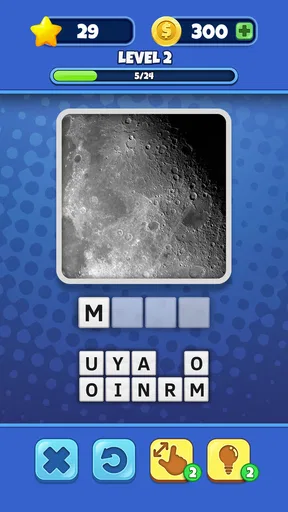
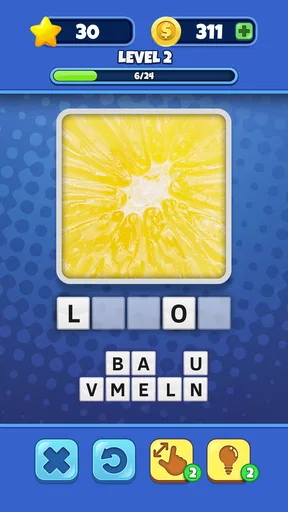
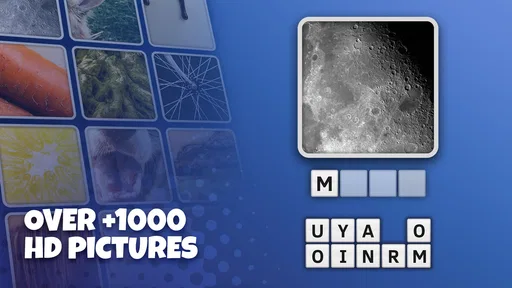
The central task is easy to understand: look at a zoomed-in picture and type what you think it shows. I found that direct format more inviting than trivia games that begin with a long set of rules or several modes to learn. The interface is described as clean and user-friendly, and the simple question-and-answer loop suits quick play. The game’s current version is 2.0.3.
That simplicity has a useful trade-off. The picture itself does most of the work, so the experience depends on whether I can make out its shapes and details on my screen. A familiar object may become hard to recognize when only a small portion is visible. I would take a moment to inspect the whole image before guessing rather than immediately typing the first association that comes to mind. The game is meant to make you look twice, and a little patience can be more useful than a fast answer.
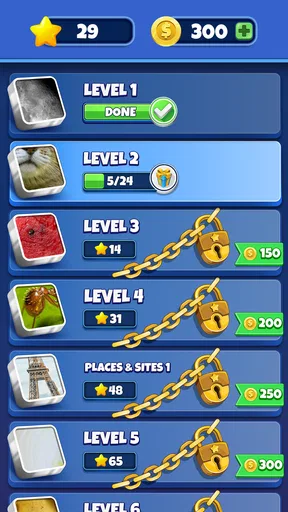
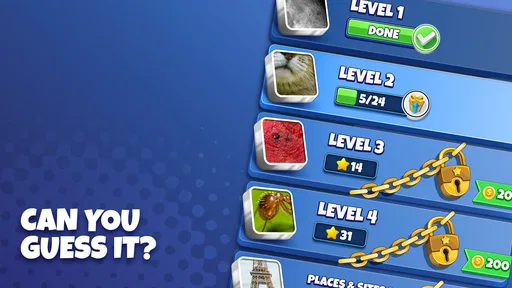
The collection covers brands, places, and objects from around the world, which gives the guessing a broader feel than a quiz restricted to one subject. That variety can be fun, but it also means not every image will feel equally familiar to every player. A landmark or brand I recognize quickly may be less obvious to someone with different experiences. I see that as part of the challenge, though it can also make a puzzle feel less fair when recognition depends on prior exposure rather than visual reasoning.
Hints, pacing, and spending
When I get stuck, hints can reveal letters or remove incorrect choices, and there is also an option to skip a level. These are practical ways to keep one difficult image from stopping a session altogether. I would save help for puzzles where I have inspected the picture carefully and still have no sensible lead; using a hint too early takes away the satisfying moment when the image finally clicks.
Solving puzzles earns coins, while in-app purchases are available from $0.99 to $49.99 per item. Since hints cost coins, the game asks me to weigh curiosity against progress: do I spend a little help now, or try another minute before moving on? That choice is a real part of the experience rather than a reason to rush into a purchase. I would treat the optional spending as just that—optional—and avoid buying anything unless I already know I enjoy the game’s steady stream of picture puzzles.
Worth Reading Before You Choose

EA SPORTS FC Mobile 26 Is a Bigger Football Game, but It Takes Time

Flipboard Shows What News Apps Must Do Beyond the Feed

Switching to Android Auto Means Rethinking Your Driving Routine

Google Calendar Makes a Crowded Week Easier to Manage

Ludo King Makes the Most of the Minutes Between Plans

Baby Panda World Brings Quick Play to Modern Phones, but Its Game Library Feels Busy
Playing with other people
The social elements can make an otherwise quiet guessing game more lively. You can connect with friends and challenge them, while a worldwide leaderboard gives competitive players another reason to keep solving. I can imagine passing the same image around and seeing who spots the answer first; the fun comes as much from comparing guesses as from getting the point.
That competitive layer is not essential, though. If I want a private, low-pressure puzzle break, the basic image-guessing idea still makes sense without turning every session into a contest. And if my friends prefer word games or knowledge quizzes, the picture-based format may not be the game that keeps everyone engaged. The best match is a group that likes visual clues and does not mind occasionally being stumped.
Images, comfort, and everyday access
In a game built around zoomed-in images, visual comfort matters more than elaborate controls. Clear pictures and a zooming function that works smoothly help keep attention on the clue rather than on the mechanics. Even so, close inspection can be tiring, especially during a long session or on a small screen. I would play in short stretches, increase the device’s text or display size if that helps with surrounding interface elements, and take a break when the image starts to blur into meaningless detail.
The game’s basic interaction involves looking and typing, with hints offering another route when recognition stalls. That is a relatively straightforward setup for players comfortable with those actions, but it may not suit someone who finds sustained visual searching difficult or prefers audio-led play. I would not assume that a visual puzzle becomes accessible simply because it has a simple interface: the core challenge still relies on interpreting pictures.
It is also easy to imagine using it in small gaps in the day: a few puzzles while waiting for a ride, during a quiet break, or alongside a friend at home. The same short-round feel can be less convenient in a setting where looking closely at a screen is distracting or uncomfortable. I would keep it for moments when I can give the images my attention rather than trying to guess while walking or doing something that needs focus.
The Zoom-In Challenge
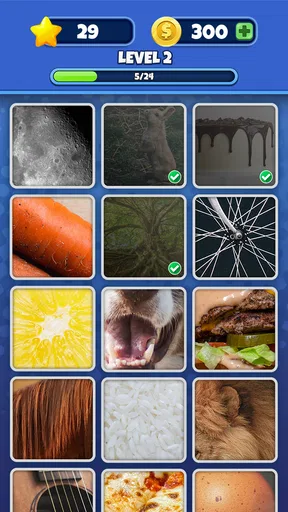
So, what’s the deal with this game? It’s pretty straightforward but incredibly addictive. Guess it! Zoom Pic Trivia Game throws you into a world of zoomed-in images where your task is to guess what the heck you’re looking at. From everyday items to famous landmarks, you’ll be surprised at how different things look up close.
The app itself is quite user-friendly. It’s got a clean interface that makes it easy to jump right into the guessing game. You get a zoomed-in picture, and you have to type in your guess. Sounds simple, right? Well, not so fast! Some images are real head-scratchers.
Hints and Helpers
Stuck on a level? No worries, the game’s got your back. There are hints available to nudge you in the right direction. You can reveal letters in the word or remove some incorrect letters. And if you’re really stumped, you can even skip the level. But beware, using these hints will cost you coins, so spend them wisely!
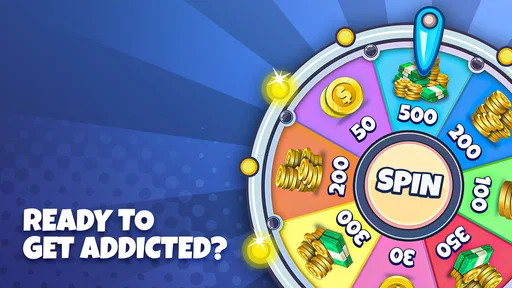
Coins are earned by solving puzzles, and you can also purchase them if you’re feeling impatient. It’s a pretty fair system that keeps you coming back for more without being too aggressive on the wallet.
Social Fun
One of the cool features of Guess it! Zoom Pic Trivia Game is the social aspect. You can connect with friends and challenge them to see who’s the ultimate zoom-in master. It adds a fun competitive edge, especially when you’re both struggling with the same tricky image.
The game also has a leaderboard, so you can see how you stack up against other players worldwide. It’s a nice touch for those who like to climb the ranks and showcase their trivia prowess.
Visuals and Variety
Visually, the game is pretty appealing. The images are clear, and the zooming function works seamlessly. The variety in the pictures keeps things fresh, and you never really know what to expect next. One moment you’re looking at a zoomed-in watermelon, and the next, it’s a part of the Eiffel Tower. It keeps you on your toes!
The game updates regularly with new content, so there’s always something new to guess. This regular refresh keeps the game engaging over time, ensuring that players don’t get bored too quickly.
Final Thoughts
Overall, Guess it! Zoom Pic Trivia Game is a delightful mix of fun, challenge, and a little bit of frustration. It’s perfect for those moments when you want to relax but still keep your brain engaged. Whether you’re a trivia buff or just someone who enjoys a good puzzle, this app is definitely worth checking out. Just don’t blame me if you find yourself hooked!
So, are you ready to put your guessing skills to the test? Dive into the world of zoomed-in mysteries and see if you can guess them all. Happy guessing!
Who will enjoy it, and who may prefer another game
I think this is a particularly good fit for people who like visual puzzles but do not want every answer to depend on memorizing facts. It can also work well for mixed-age family play, provided everyone is comfortable with its Teen rating and screen-based image clues. A useful way to play together is to let each person say what detail they noticed before anyone submits a guess. That turns a quick answer into a small reasoning exercise and gives less experienced players a fair chance to contribute.
On an ordinary afternoon, I could see opening it while waiting for a coffee order or taking a short break between tasks. I would solve one picture, pause if it became frustrating, and return later rather than treating the game as something that needs a long uninterrupted session. It is especially handy when a friend is nearby: one person can describe a detail they notice while another considers possible objects. That informal collaboration makes the images feel less like a test.
Compared with standard multiple-choice trivia, this game asks for observation and association more than broad factual recall. Compared with word puzzles, it gives you a picture to interpret rather than a clue made entirely of language. That is its strongest distinction, but it also narrows its audience: someone looking for deep subject lessons, a long narrative, or fast competitive action will probably be better served by another kind of game. Players who dislike guessing from partial images may find the central mechanic repetitive rather than relaxing.
Small strategies that make the puzzles fairer
When an image seems impossible, I find it useful to move through a few mental checks before spending coins. First, look for broad categories—food, a place, packaging, or a familiar object—rather than trying to name the exact item immediately. Then consider whether the visible texture or edge suggests material, scale, or shape. Finally, think about how the crop could change the apparent identity of the subject. This is not a shortcut that guarantees an answer; it simply helps prevent random guesses from draining the fun.
Hints have different practical value depending on how close I am. If I have a likely answer but cannot settle on its spelling, revealing a letter may be more helpful than removing choices. If I have no idea what category I am looking at, a skip can be a better way to protect the pace of a casual session. I would use coins selectively, since the satisfaction of recognizing an image is the main reward. The option to buy more coins is there, but a player who dislikes any purchase prompts should decide in advance to keep the game strictly free.
One limitation of picture-based trivia is that familiarity can masquerade as skill. Someone who has seen a particular brand or landmark before may answer quickly, while another person can study the same crop and have no useful reference point. When playing with friends, I would treat the leaderboard as a light extra rather than a definitive measure of who is smarter. It rewards progress in this particular format, not general knowledge or careful reasoning across every kind of quiz.
Choosing the right setting and expectations
For someone comparing puzzle apps, the key question is whether looking closely at a cropped image sounds enjoyable. If yes, this offers a more visual change of pace than a conventional trivia quiz, and the hints make a stubborn puzzle less likely to end the session. If you prefer to answer by listening, dislike typing, or need a game that can be played without sustained attention to the screen, this is not the option I would choose. The image is the clue, so visual attention is central rather than incidental.
Screen size and surroundings can affect the experience even when the game itself is easy to pick up. A bright, calm spot and a comfortable viewing distance make it easier to notice subtle shapes; a crowded commute or glare can make the same picture needlessly frustrating. I would avoid trying to solve a puzzle while crossing a street or handling another task. That is ordinary common sense, but it matters more here than in a game that can be played mostly by sound or with brief glances.
There is also a difference between an occasional tricky picture and a genuinely enjoyable challenge. If I have tried several reasonable interpretations and still cannot connect the crop to an answer, I would use a hint or move on instead of turning a break into a chore. The game works best when the difficulty creates a satisfying “aha” moment, not when I feel obliged to prove I can solve every image without help.
A balanced recommendation
At its best, this is an easy game to share, a pleasant way to wake up visual attention, and a useful alternative when a familiar quiz format feels stale. Its simple premise is also its main boundary: the puzzles all rely on recognizing what a close-up picture represents, and that can be tiring or culturally uneven. I would choose it for short, relaxed sessions, especially with someone who enjoys talking through guesses, but I would skip it if picture interpretation is uncomfortable or if I want a richer mix of mechanics.
The game is free to start, with optional coin purchases, and its 1M+ installs suggest that plenty of players have tried this style of challenge. For me, the best approach is to play at my own pace, use hints only when they genuinely help, and see the social features as a bonus rather than a requirement. That keeps the focus where it belongs: on noticing the small visual clue that makes a mysterious crop suddenly make sense.
Pros
- Engaging gameplay with zoomed images.
- Wide variety of challenging levels.
- User-friendly interface and controls.
- Frequent updates with new content.
- Offline play available for travel.
Cons
- Ads can be intrusive at times.
- Limited hints can stall progress.
- Some images are too abstract.
- In-app purchases can be pricey.
- No multiplayer mode available.
FAQs for Guess it! Zoom Pic Trivia Game
What is Guess it! Zoom Pic Trivia Game about?
Guess it! Zoom Pic Trivia Game is a fun and engaging app where players must identify objects in images that are zoomed in. The challenge is to guess the object correctly with as few clues as possible. It's perfect for those who love puzzles and want to test their observation skills.
Is Guess it! Zoom Pic Trivia Game free to play?
Yes, Guess it! Zoom Pic Trivia Game is free to download and play. However, it offers in-app purchases for hints and additional content, which can enhance the gaming experience. Players can choose to purchase these items or enjoy the game without spending money.
What are the main features of Guess it! Zoom Pic Trivia Game?
The game features hundreds of levels with diverse and interesting images. It offers a hint system to assist players who might be stuck and includes a daily challenge mode for extra rewards. The app also has leaderboards to compete with friends and other players globally.
Does Guess it! Zoom Pic Trivia Game require an internet connection?
While Guess it! Zoom Pic Trivia Game can be played offline, certain features such as daily challenges and leaderboards require an internet connection. Playing online also ensures you receive updates and new content regularly, enhancing your gaming experience.
Can children play Guess it! Zoom Pic Trivia Game safely?
Guess it! Zoom Pic Trivia Game is designed to be family-friendly, with content suitable for all ages. However, parents should be aware of in-app purchases and ensure that children understand how to play safely without making unintended purchases.


